Downloads
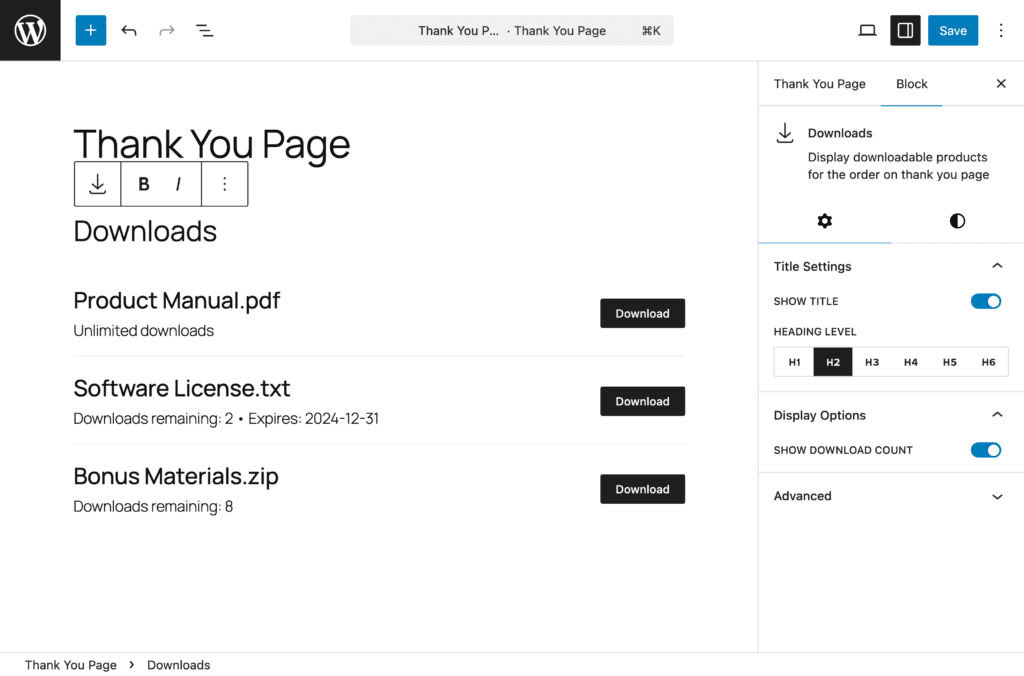
The Downloads Block displays download links for digital or downloadable products included in the order, providing customers with easy access to their purchased files.
Overview#
Block Name: Downloads
Category: RedFox Thank You
Purpose: Display downloadable product links
Available In: Free and Pro
What It Does#
This block:
- Shows download links for digital products
- Displays file names and download buttons
- Shows remaining downloads and expiry dates
- Only appears when order contains downloadable products
When It Displays#
The Downloads Block automatically shows when:
- Order contains downloadable products
- Products have downloadable files attached
- Customer has valid access to downloads
The block is hidden when:
- Order has no downloadable products
- Only physical products in order
- Download access has expired
What Gets Displayed#
Download Information#
For each downloadable file:
File Name: Name of the downloadable file
Download Button: Link to download the file
Downloads Remaining: How many downloads left (if limited)
Expiry Date: When download access expires (if set)
Block Settings#
Title Settings#
Control the “Downloads” heading display:
- Show Title – Toggle to show/hide the title (default: on)
- Heading Level – Choose H1-H6 for semantic HTML structure (default: H2). Only visible when the title is enabled.
Also, the title text can be edited directly in the block editor.
Display Options#
- Show Download Count – Toggle to display the number of downloads remaining for each item (default: on)
Style Settings#
All style controls are found in the Styles tab of the block inspector panel.
Text#
Control general text styling:
- Font Size: Adjust size for better readability
- Line Height: Improve spacing between lines
- Color: Match your brand colors
- Text Alignment: Left, Center, or Right
Pro typography options:
- Font Family
Pro— Access to 1,000+ Google Fonts - Font Weight
Pro— Light (300) to Extra Bold (800), dynamically updates based on selected font - Font Style
Pro— Toggle italic styling - Text Decoration
Pro— Underline, Strikethrough, or None - Letter Spacing
Pro— Fine-tune spacing between characters (-10 to 10) - Text Transform
Pro— Uppercase, Lowercase, Capitalize, or None
Responsive Support: Supported.
Title Text#
Control the “Downloads” heading styling. Only visible when the title is enabled in Title Settings.
- Font Size: Adjust title size for better hierarchy
- Line Height: Control spacing for title text
- Color: Set distinct color for the title
- Text Alignment: Left, Center, or Right
Pro typography options:
- Font Family
Pro— Access to 1,000+ Google Fonts - Font Weight
Pro— Light (300) to Extra Bold (800), dynamically updates based on selected font - Font Style
Pro— Toggle italic styling - Text Decoration
Pro— Underline, Strikethrough, or None - Letter Spacing
Pro— Fine-tune spacing between characters (-10 to 10) - Word Spacing
Pro— Adjust spacing between words (-10 to 50) - Text Transform
Pro— Uppercase, Lowercase, Capitalize, or None
Responsive Support: Supported.
Download Items Title Text#
Control the download item name text styling:
- Font Size: Adjust item name size
- Line Height: Control spacing for item text
- Color: Set color for download file names
- Text Alignment: Left, Center, or Right
Pro typography options:
- Font Family
Pro— Access to 1,000+ Google Fonts - Font Weight
Pro— Light (300) to Extra Bold (800), dynamically updates based on selected font - Font Style
Pro— Toggle italic styling - Text Decoration
Pro— Underline, Strikethrough, or None - Letter Spacing
Pro— Fine-tune spacing between characters (-10 to 10) - Text Transform
Pro— Uppercase, Lowercase, Capitalize, or None
Responsive Support: Supported.
Download Button#
Style the download buttons:
Free:
- Background Color — Button background color
- Text Color — Button text color
Pro:
- Gradient Background
Pro— Gradient background for the button - Typography
Pro— Full typography controls (font family, weight, style, decoration, letter spacing, word spacing, text transform) - Spacing
Pro— Padding and margin controls for the button - Border & Border Radius
Pro— Border width, style, color, individual sides, and border radius - Box Shadow
Pro— Color, horizontal/vertical offset, blur, spread, and inset toggle - Hover Effects
Pro— Separate styling for hover state (background color, text color, border color)
Responsive Support: Supported.
Background#
Customize the block background:
Free:
- Background Color — Color picker with custom hex values
Pro:
- Background Image
Pro— Upload or select from media library with size, position, repeat, and attachment options - Background Gradient
Pro— Linear and radial gradients with pro-exclusive presets - Background Overlay
Pro— Color or gradient overlay with blend modes
Responsive Support: Supported.
Spacing#
Control block spacing:
- Padding: Internal space (inside the block) — Top, Right, Bottom, Left
- Margin: External space (around the block) — Top, Right, Bottom, Left
Features: Linked/unlinked sides, presets, box model visualization, auto values.
Responsive Support: Supported.
Border Pro#
Add and customize borders. Automatically available when the Pro version is active.
- Border Width — Set width in pixels or other units
- Border Style — Solid, Dashed, Dotted, and more
- Border Color — Full color picker
- Individual Sides — Set borders per side or all at once
- Border Radius — Round corners individually or all at once
Responsive Support: Supported.
Box Shadow Pro#
Add depth and dimension. Automatically available when the Pro version is active.
- Color — Shadow color with full color picker
- Horizontal Offset — Range: -100 to 100 (default: 0px)
- Vertical Offset — Range: -100 to 100 (default: 2px)
- Blur — Range: 0 to 200 (default: 4px)
- Spread — Range: -100 to 100 (default: 0px)
- Inset — Toggle for inner shadow
Set a shadow color to get started — sensible defaults are applied automatically.
Responsive Support: Supported.
Sizing Pro#
Control block dimensions with precision. Automatically available when the Pro version is active.
- Width / Height
- Min Width / Min Height
- Max Width / Max Height
Responsive Support: Supported.
Free vs Pro Comparison#
| Feature | Free | Pro |
|---|---|---|
| Title Settings (Show, Heading Level) | ✅ | ✅ |
| Display Options (Show Download Count) | ✅ | ✅ |
| Text (Font Size, Line Height, Color, Alignment) | ✅ | ✅ |
| Title Text Styling | ✅ | ✅ |
| Download Items Title Text Styling | ✅ | ✅ |
| Text Typography (Font Family, Weight, Style, etc.) | ❌ | ✅ |
| Title Text Typography | ❌ | ✅ |
| Download Items Title Typography | ❌ | ✅ |
| Download Button (Background & Text Color) | ✅ | ✅ |
| Download Button (Gradient, Typography, Spacing, Border, Shadow, Hover) | ❌ | ✅ |
| Background Color | ✅ | ✅ |
| Background Image, Gradient, Overlay | ❌ | ✅ |
| Spacing (Padding & Margin) | ✅ | ✅ |
| Border & Border Radius | ❌ | ✅ |
| Box Shadow | ❌ | ✅ |
| Sizing (Width, Height, Min/Max) | ❌ | ✅ |